Get to know event spaces
Last updated: September, 2026
Our event spaces offer a range of features to help you create, manage, display, and host events in your community. The space is designed to enhance the admin and member experience with easy navigation and greater visibility of events.
Elevate community engagement
In ever-evolving communities, fostering meaningful connections and empowering members to thrive is paramount. Whether you aim to connect, educate, or simply provide a platform to your members for socializing, you can achieve this by organizing impactful events that unlock the full potential of your community.
We offer dedicated space types to host events, allowing you to create multiple spaces within different groups dedicated to specific themes and topics in your community. You can host free or paid events in these spaces, or use Circle paywalls to restrict access to the entire event space behind a membership paywall.
Here are some ideas for hosting events:
Workshops and Masterclasses: Host workshops and masterclasses on topics relevant to your community's interests or industry.
Orientation sessions: Organize orientation events to welcome new members and help them get acquainted with your community.
Collaborative events: Host recurring sessions such as office hours where community members ask questions, discuss topics, work on challenges, and share learnings.
Meetups: Organize in-person or virtual meetups to connect with community members.
Coaching and wellness sessions: Create events for one-to-one or one-to-many coaching and wellness sessions where members can receive guidance from admin or experts.
Celebrations: Mark special occasions and holidays with themed events.
Set event space layout
There are three layout options for the event space layout:
Thumbnail: Displays events with visually appealing thumbnails using the event cover image.
List: Provides a clean, minimalist view of events.
Calendar: Shows events in a monthly calendar format, allowing members to view past and future months.
Utilize topics
Similar to post spaces, you can use topics to organize events into various categories. This helps you maintain a streamlined event space while accommodating a diverse range of events.
For instance, instead of creating separate event spaces for different types of events, you can create one comprehensive event space and differentiate the events using topics.
You can add up to 20 topics to an event space and assign up to five topics to each event. This flexibility ensures that your events are well-organized and easily discoverable by members, enhancing their overall experience.
📚 To explore further details on topics and configuration settings, check out our guide here.
Create events
Create events with flexible schedule options, visually striking cover images, and media-rich descriptions.In addition, you have a range of options to choose from when it comes to event location—from in-person events and custom locations to virtual events powered by Circle live. With the Circle live feature integrated directly into events, you can host exciting live events within your community, eliminating the need to use third-party software!
📚 For more information on event creation, see the following articles:
View events
Our event space design is carefully crafted so that your events take center stage, showcasing highlights of key event details. This allows you to offer a seamless experience to your members and optimize RSVPs.
In addition to topics, events are also organized into two categories: Upcoming and Past. To access upcoming and past events, click the dropdown icon beside the category.
Upcoming events are displayed by month, providing you with a clear idea of what's coming next. Meanwhile, past events are viewable all at once, allowing you to quickly check what has already taken place in the community.
💡 Tip: Admins and moderators can also access the Draft tab in the space if there are event drafts saved within it.
Each event card shows essential details, including:
Event title
Date and time
Location
Option to manage RSVP
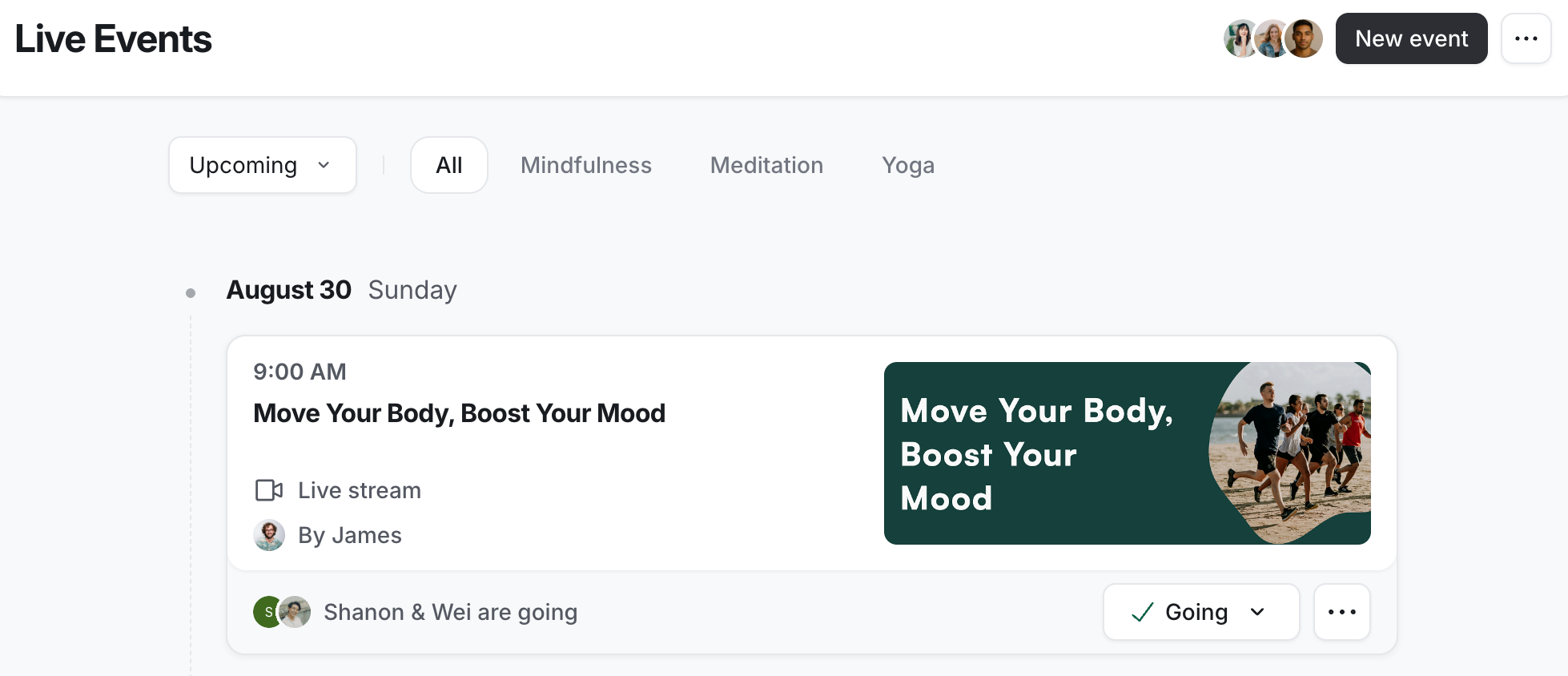
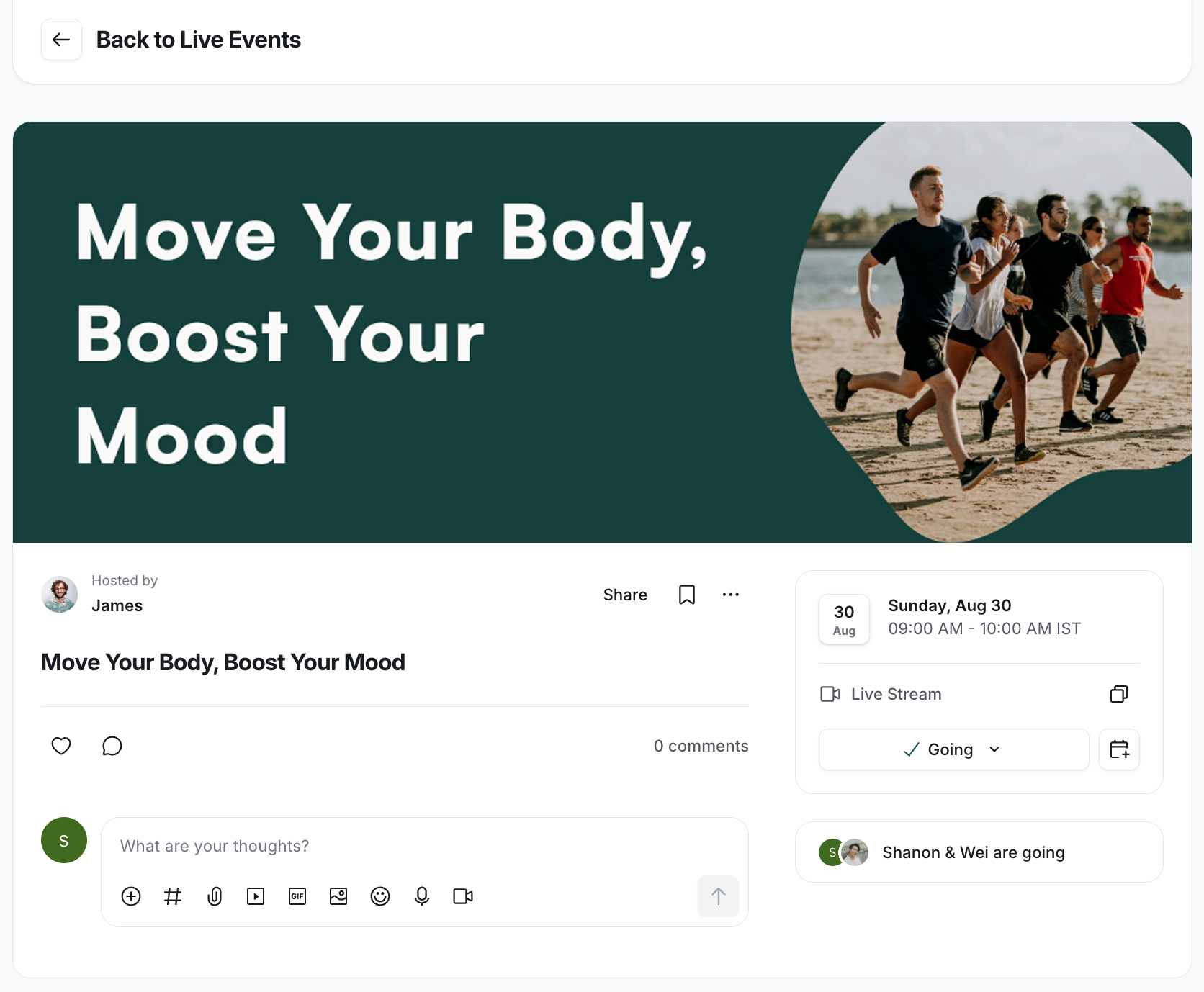
When you click the event, you'll be directed to the event details page. Here, you'll find comprehensive details about the event, such as:
Cover image and event description.
Date and time of the event.
Location details for the event.
Options to manage RSVP status and add the event to your calendar.
Total count of event attendees (full attendee list viewable by the event creator, admin, and moderator).
Comments section for discussions and interactions related to the event.
💡 Tip: From the event details page, you can share your event publicly to with a broader online audience. For more information, see Share events publicly.
Live now
When events are in progress, they automatically appear in the Now section on the desktop or mobile web browser, making it easier to discover and participate in these events. For Circle live events, as soon as the event host starts the live session, it will also appear in that section.
Featured event
To give your key event the exposure it deserves, position it front and center within the event space. By pinning it to the event space, you can make it appear as a featured event.
The featured event showcases a cover image and provides a sneak peek into the event description. Additionally, it highlights essential details such as event location, host, and a countdown displaying the time remaining until the event commences.
Next event
This feature helps you grab members’ attention on the upcoming event by automatically displaying the latest event at the top in the Next event section on the desktop. This helps you increase participation in your upcoming events.
This section is turned on by default in the event space. However, you have the flexibility to toggle it on or off anytime by visiting the Customize tab in event space settings. Like a featured event, the latest event appearing here will display the same vital information.
ℹ️ Note: The Next event section will only be visible when there is no pinned event in the space. If you have pinned an event in the space, it will take precedence over the Next event section.
Circle community resources
Ready to get started?
Check out the following articles to get started with your event space.