View affiliates and their referral activity
Last updated: August, 2026
Tracking your affiliates' performance is essential for managing your referral program effectively. This article covers how to view your affiliate list and understand key metrics, such as visits, leads, and conversions, for each affiliate.
View affiliates
To access the affiliates list, click Payments in the left sidebar, then select Affiliates.
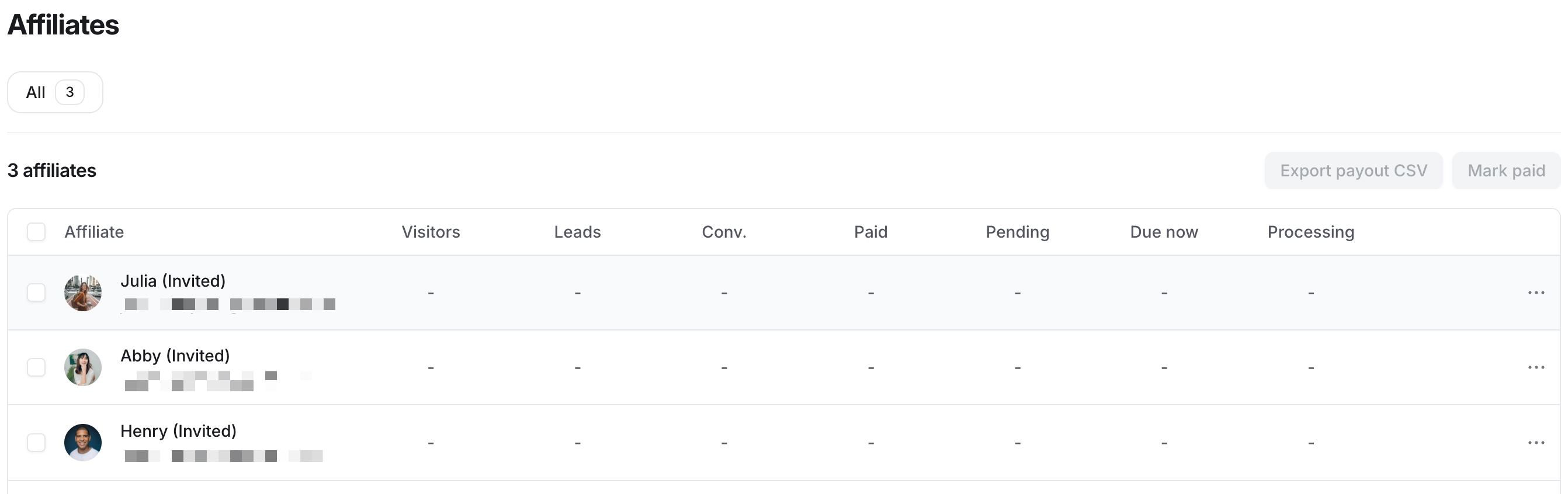
On the affiliates page, you'll find a comprehensive overview of your affiliate details and their referral performance, including:
Names and emails of your affiliates.
The number of visitors attracted by each affiliate through referral links.
The count of new leads generated by each affiliate.
The number of conversions contributed by each affiliate.
Detailed commission payouts, categorized under different columns representing various payout statuses.
While on the affiliate page, you have the following options available:
Invite affiliates: Expand your affiliate network by inviting existing community members or non-members to join the affiliate program by clicking Invite affiliate in the top-right corner. For detailed steps, see Invite affiliates.
Manage payouts: Manually process payouts earned by affiliates. Export the compliant CSV file and proceed to pay affiliates using your preferred payout method, such as PayPal or Wise. To learn more about payouts, see Pay affiliate commissions.
Deactivate or re-enroll affiliates: Deactivate an affiliate from your affiliate program to prevent them from earning commissions moving forward. You also have the ability to re-enroll a deactivated affiliate into the program anytime. For more information, see Deactivate affiliates.
How we measure visits, leads, and conversions
Understanding how visits, leads, and conversions are measured helps you better track affiliate performance. Here's a breakdown of each metric:
Visitor: A visit is recorded when someone clicks an affiliate link and lands on the paywall checkout page. This indicates interest and engagement generated by the affiliate.
-
Lead: A lead is counted when someone purchases the community paywall and creates a new community account. This also includes individuals who start a trial and create a new community account.
ℹ️ Note: If an existing member purchases a paywall via an affiliate link, it does not count as a lead but is counted as a conversion.
-
Conversion: A conversion is recorded when someone completes a purchase of the paywall through the affiliate link. This applies to both new and existing members. Here are some additional details:
If a member subscribes to a paywall with recurring subscription or installment pricing, only the initial payment is counted as a conversion. Subsequent payments are excluded from conversion metrics.
If a member purchases two different paywalls using the affiliate’s link, each purchase is counted as a separate conversion.
Starting a trial does not count as a conversion.