Build pages with Circle AI
Last updated: August, 2026
Circle AI can help you create web pages using your existing brand, style, and content. Describe the page you want and watch it take shape in a live preview, with every change saved to version history, so you can undo changes at any point.
This article walks you through how to build and edit web pages with Circle AI.
Build web pages with Circle AI
You can ask Circle AI to build a full page from scratch or target a specific section in an existing page. Simply describe the page you'd like to build in plain language, or drop in a URL or screenshot from an external page, and Circle AI will build it for you in real time.
💡 Tip: Circle AI will never publish a page on its own. Your page stays private until you publish it.
Here are some ways you can use Circle AI to build and edit web pages.
Build pages from scratch
Tell Circle AI about your offering, including what it is, the price, and the action you want visitors to take. Circle AI will then generate the page structure, copy, and buttons for you.
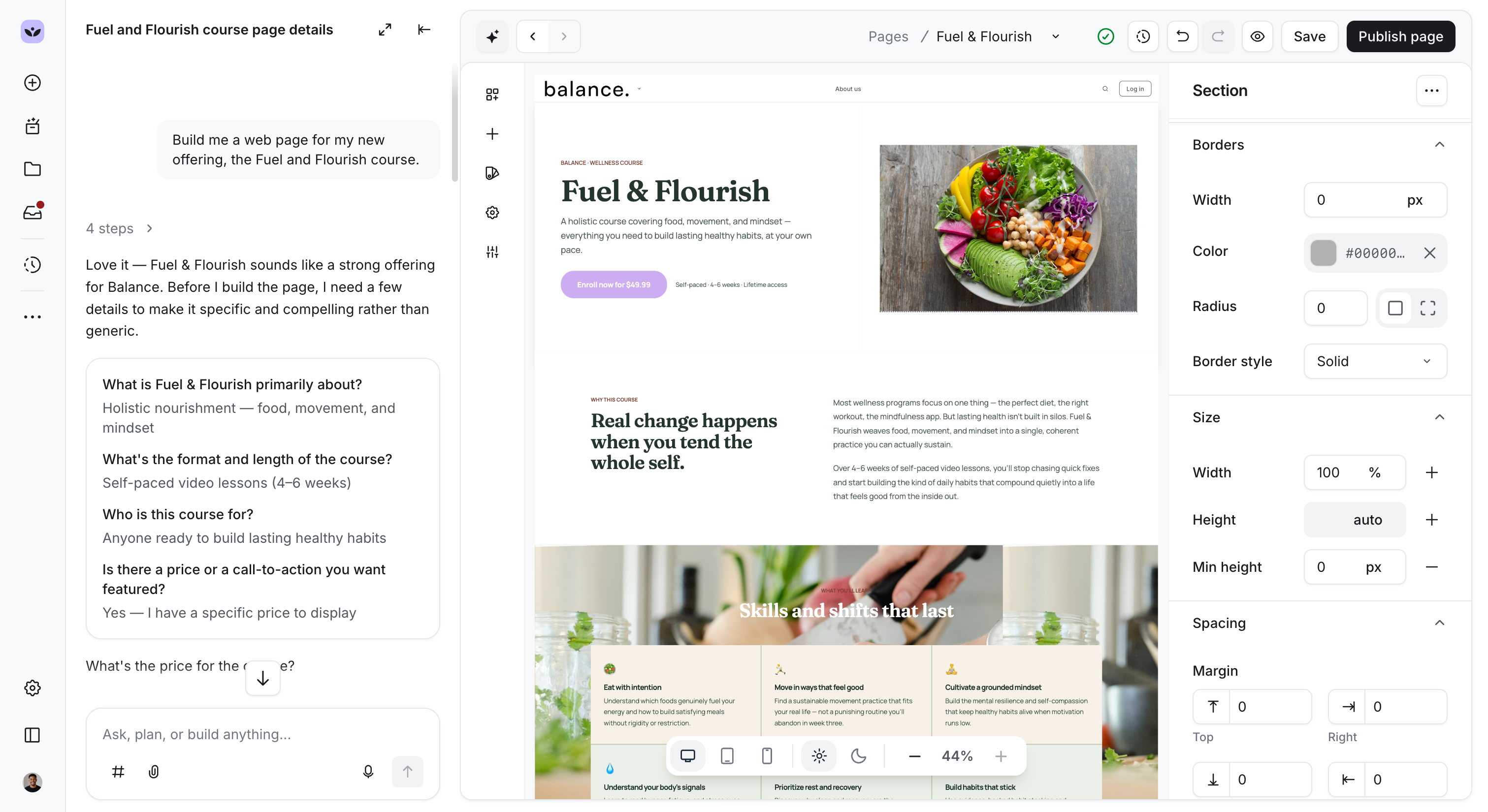
Once it's built, you can review the page, edit the copy as needed, and add any paywall links or URLs to the relevant buttons. You can edit the content manually in the preview or ask Circle AI to change a specific element.
For example, you could ask it to “Update the paragraph beside the Enroll button in the hero section to: Self-paced 4-6 weeks”, or “Add a testimonials block below the third section”.
Recreate a page from an existing source
If you have a page you want to bring into Circle, you can give Circle AI a URL, a screenshot, or a design file, and it recreates the page for you using your brand and styles.
Edit existing page content
You can ask Circle AI to add new elements and blocks to an existing page or adjust the tone of copy that's already on your page. Circle AI makes the changes in the preview pane, and you can keep refining in the chat until it reads the way you want.
Run page audits
Circle AI can audit your pages for accessibility, broken links, and SEO.
You can ask it to:
Check for issues that could prevent some users from accessing the page content.
Check for missing or weak signals that affect how the page ranks in search.
Flag any links on the page that no longer work.
ℹ️ Note: At this time, Circle AI will not work on pages built from legacy templates. If you select a legacy-template page, Circle AI flags this and suggests starting fresh with a new page.