Explore the capabilities of a moderator
Last Updated: December 18, 2022
As your community grows, you'll want others to help with the administration and moderation of content within spaces: virtual assistants, team members, volunteers, cohort leaders, and more.
We've got you covered! You can now scale your community with ease by assigning moderators to spaces and space groups.
What can a moderator do?
Moderators receive full admin capabilities respective to their assigned spaces or groups.
ℹ️ Note: It is important to note that moderators do not have the capability to access or manage other aspects of the community, including community settings, analytics, plans, and billing. These areas are exclusively reserved for admins.
Let's look at the differences between a moderation role and an admin role at a high level.
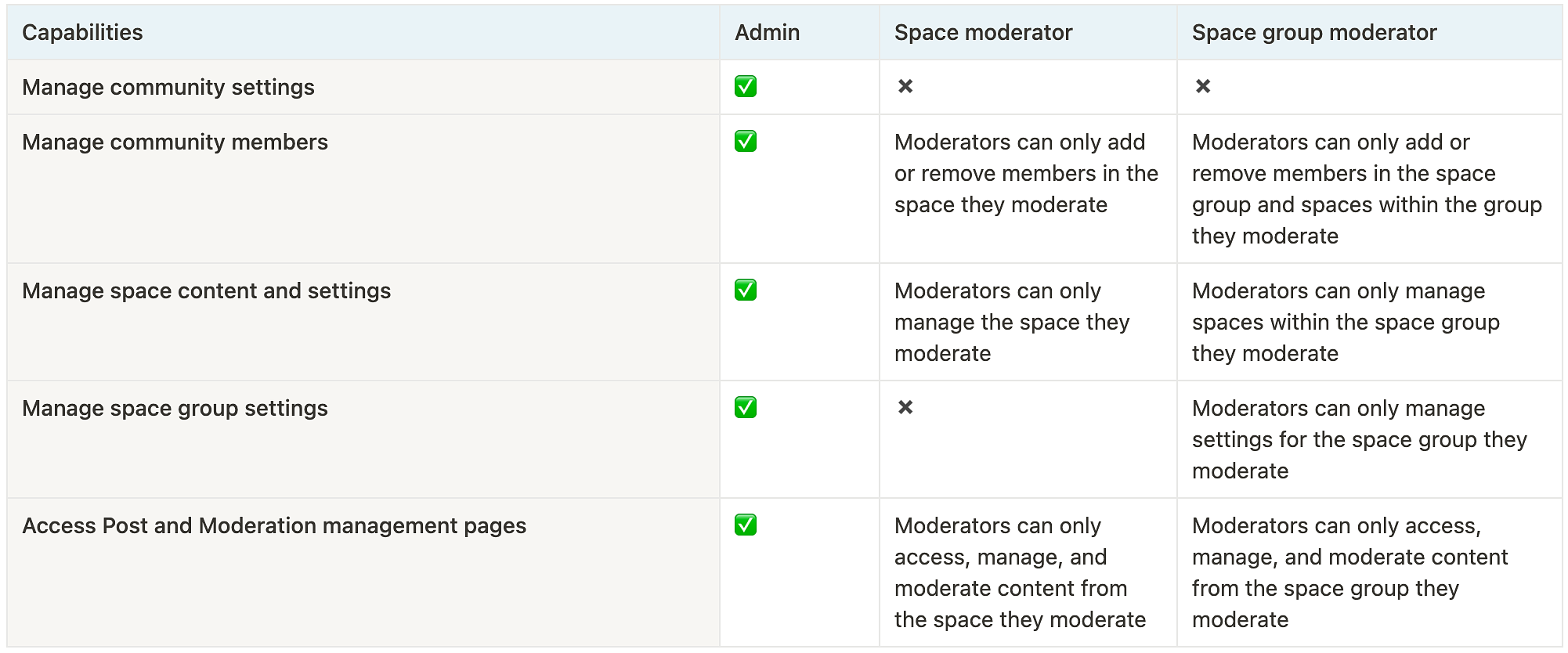
To learn about moderator’s capabilities respective to their assigned spaces or groups in detail, please refer to the following:
Space moderators
Post space
Customize space settings
Manage space bookmarks
Add/remove members
Pin/unpin posts
Create/schedule post
Edit/remove posts
Edit/remove comments
Access the post management page
Review flagged posts and comments
ℹ️ Note: The ability to schedule the posts and access the Posts page for a space is available to space moderators only. Space group moderators do not have this capability.
Event space
Customize space settings
Manage space bookmarks
Add/remove members
Create events
Pin/unpin events
Edit/remove events
Edit/remove comments
Review flagged comments
Chat space
Customize space settings
Manage space bookmarks
Add/remove members
Pin a chat message
Delete messages
Course space
Customize space settings
Manage space bookmarks
Add/remove members
Create/edit course lessons
Access course directory
Pin a comment in the lesson
Delete comments
Member space
Customize space settings
Add/remove members
Space group moderators
Customize space group settings
Create new post spaces
Customize space settings within the group
Manage spaces within the group with the same capabilities as the space moderator
Delete a space inside the space group
❗Important: Only space group moderators have the ability to delete a space inside the space group they moderate. Individual space moderators won’t be able to delete the space.
ℹ️ Note: Space group moderators can only create post-type spaces in the space group they moderate.
Ready to assign moderators?
📚 To learn more about ways to assign moderators in your community, see Assigning moderators.