Understanding and managing your API billing
Last updated: April 6, 2026
Your community’s API billing is designed to be flexible and adapt as your needs grow. This article explains how API billing and overages work for your community.
About API billing
If your community is on a Business plan or above, you have access to the Admin API and Headless API, each with specific usage limits. If your API usage exceeds the limit included in your plan, overage charges will automatically apply for the excess usage to the following API tokens:
Admin API (v1 & v2) – Excludes Zapier tokens
Headless API
This automatic overage billing works similarly for both Admin API and Headless API.
API limits
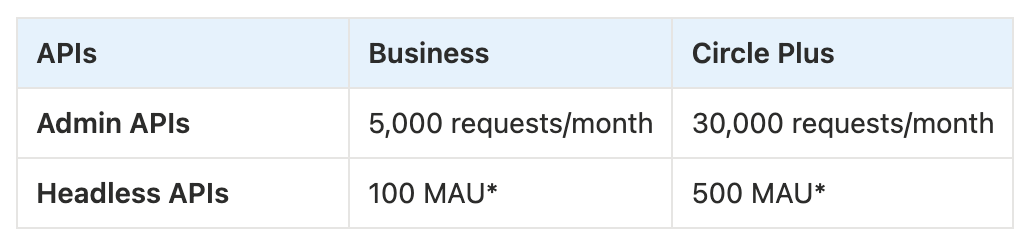
* MAU (Monthly Active Users): When a member is authenticated and interacts with the community’s custom-built community features, they will be counted as MAU.
ℹ️ Note: If you are on a legacy Professional plan that includes access to the Admin API, your community will be subject to the API limits and overage charges of the Business plan. If you cancel your legacy plan, you will lose access to the Admin API. To regain access, you will need to upgrade to a Business plan or higher.
API overage pricing
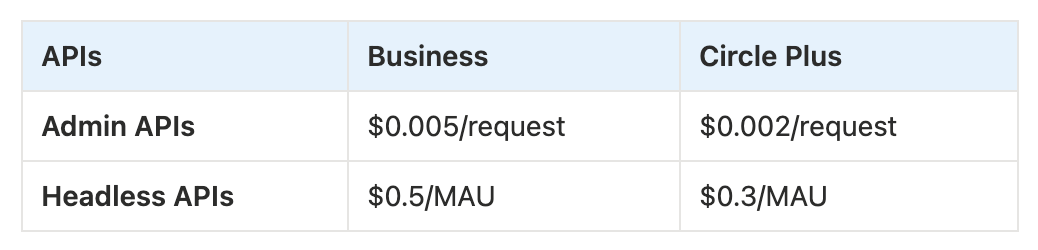
* MAU (Monthly Active Users): When a member is authenticated and interacts with the community’s custom-built community features, they will be counted as MAU.
How API overage charges work
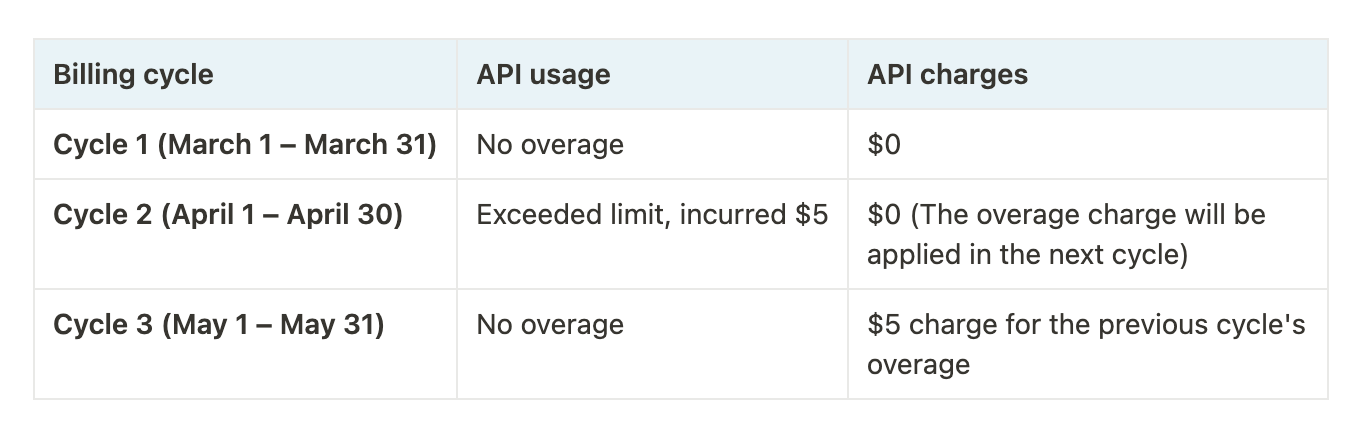
API usage is tracked monthly, and overages are calculated at the end of each billing cycle and charged on the next billing cycle.
Here’s how the billing works:
-
Monthly vs. annual community plans: Both Admin and Headless API overages are billed monthly, regardless of whether your community plan is monthly or annual.
Monthly community plan: API overage charges are added to your monthly community plan invoice.
Annual community plan: API overages are billed separately on a monthly basis. This may result in a different billing date for API overages compared to your annual plan renewal date.
💡 Tip: To find your API billing cycle start date, visit the Developers dashboard and check the API usage section on the Overview page.
-
Exceeding your allocated API limit:
-
Any API requests beyond your allocated limit during a billing cycle will incur overage charges, which will appear on the invoice for the next billing cycle.
-
Your invoice will include details such as:
The number of additional API requests made.
The cost per additional request.
Total amount of overages.
-
At the start of a new billing cycle, your API usage resets to zero, and all usage in the new cycle is deducted from your allocated limit before any overages apply.
-
Here’s an example of what API billing would look like:
Overage visibility and alerts
On the Overview page within your Developers dashboard, you can see both Admin and Headless API usage for your current billing cycle out of the total limit, in the API usage section. You can also track which endpoint is being utilized the most looking at its requests and total consumption of overall usage.
When you reach 90% of your API limit within a billing cycle, an email notification is also sent to all community admins to inform them about the usage.
This dashboard visibility and email alert help you look into your usage and make informed decisions.
Stopping API overages
Revoking your API tokens stops triggering new API calls.
If you no longer need an API token or want to prevent it from exceeding your usage limits, you can revoke the token and remove it from your community.
If you are no longer exceeding your API limits, you won’t be billed for overages. However, you will still see an API subscription listed with a $0 charge on your invoice.
Canceling API subscription
If you're no longer using APIs and wish to completely remove the API subscription from your invoices, please reach out to Circle support.