Keep your email list healthy to protect deliverability
Last updated: August 2026
If your emails aren't reaching members and contacts the way they should, the health of your contact list is often the reason. This article explains what affects email deliverability, why list hygiene matters, and how to clean up and maintain your list in Circle. For details on how your sending capacity is calculated, see Understanding email sending limits.
❗ Important: Circle delivers your emails, but you're responsible for maintaining consent and hygiene for your own contact list.
What affects your email deliverability
Inbox providers like Gmail, Yahoo, and Microsoft form an ongoing opinion of every sender based on signals like sending volume, frequency, and recipient engagement. You earn a strong sender reputation over time by starting with smaller, engaged segments and sending consistently. Irregular bursts of high volume after long gaps work against you, even if your content is fine.
ℹ️ Note: If you send from Circle's shared domain, you benefit from our overall sender reputation, and your individual sending behavior matters less. If you set up a branded sending domain, you take on more responsibility for building and maintaining that domain's reputation yourself.
Why list hygiene matters
Every email you send affects two things: your sender reputation, and the deliverability of every other email you send afterward. Two metrics matter most:
Bounce rate: the share of emails that couldn't be delivered, usually because the address is invalid or no longer in use.
Complaint rate: the share of recipients who mark your email as spam.
You can review both for any broadcast in your email analytics. As a general industry guide (not Circle-specific figures; major inbox providers apply their own standards):
Hard bounce rate: under 1% is ideal; 1–2% is worth addressing; above 2% is a serious problem.
Spam complaint rate: under 0.1% is ideal; 0.1–0.3% is worth addressing; above 0.3% is treated as a serious issue by major inbox providers like Gmail, Yahoo, and Microsoft.
Your open and click rates are also worth watching closely: they're often the earliest warning sign of list quality issues, showing up well before bounce or complaint rates climb. A steady decline in open rate for a segment is a good signal that it's time for a list clean.
Common causes of poor list hygiene
An unmaintained or stale list. This is the most common cause we see: contacts who signed up long ago, whose addresses may have changed or stopped working, sitting untouched in an active list.
Infrequent or inconsistent sending. If you go long stretches without sending, then send a large batch, recipients are more likely to have forgotten why they're hearing from you, and more likely to mark the email as spam rather than unsubscribe. Infrequent sending also means you build up less engagement data over time, making it harder to spot problem segments early.
No engagement over a long period. Contacts who haven't opened or clicked anything in the last 180 days are generally considered a "do not send" group, even if their address still technically works. Continuing to email unengaged addresses risks hitting recycled spam traps: old addresses that inbox providers repurpose to catch senders with poor list hygiene.
Low-quality or unengaging content. Content quality matters as much as list hygiene. Focus on sending high-quality, engaging content that people genuinely want to read and appreciate, not just frequent or promotional messages. Watch for common spam triggers too: subject lines in ALL CAPS, excessive exclamation marks, gimmicky language like "Free!" or "Buy now!", and emails that are mostly images with little text. Even details like subject lines and preview text make a difference in whether recipients open an email, ignore it, or report it as spam.
❗ Important: Uploading a purchased, rented, or scraped contact list is against Circle's Email Hub terms of use, in addition to being a common cause of high bounce and complaint rates. Only import contacts who've explicitly opted in to hear from you.
ℹ️ Note: Circle automatically unsubscribes contacts who hard bounce, mark an email as spam, or unsubscribe themselves, so you don't need to manually remove these. But preventing bad addresses from building up in the first place is far more effective than cleaning up after the fact.
Best practices to keep your list clean
Only add contacts who explicitly opted in to hear from you, and set clear expectations at sign-up about what they'll receive.
Send consistently. Regular sending builds engagement data and sender reputation faster than occasional large bursts.
Watch your engagement trends, not just delivery. A sustained dip in open or click rate for a segment is a sign it's due for a clean, often before bounce or complaint rates move at all.
Run a re-engagement campaign for dormant contacts before unsubscribing them. A short campaign asking if they still want to hear from you gives genuinely interested contacts a chance to confirm, while making it easy to unsubscribe the rest.
Warm up new or newly imported lists gradually. Start with smaller, more engaged segments before sending to a full list.
Make list audits a regular habit. Set a recurring cadence (quarterly, for example) to review engagement trends and clean up your list, rather than waiting until bounce or complaint rates force the issue.
How to clean up your list in Circle
Validate your list with a third-party email verification service, such as Kickbox or NeverBounce, to identify invalid or high-risk addresses.
-
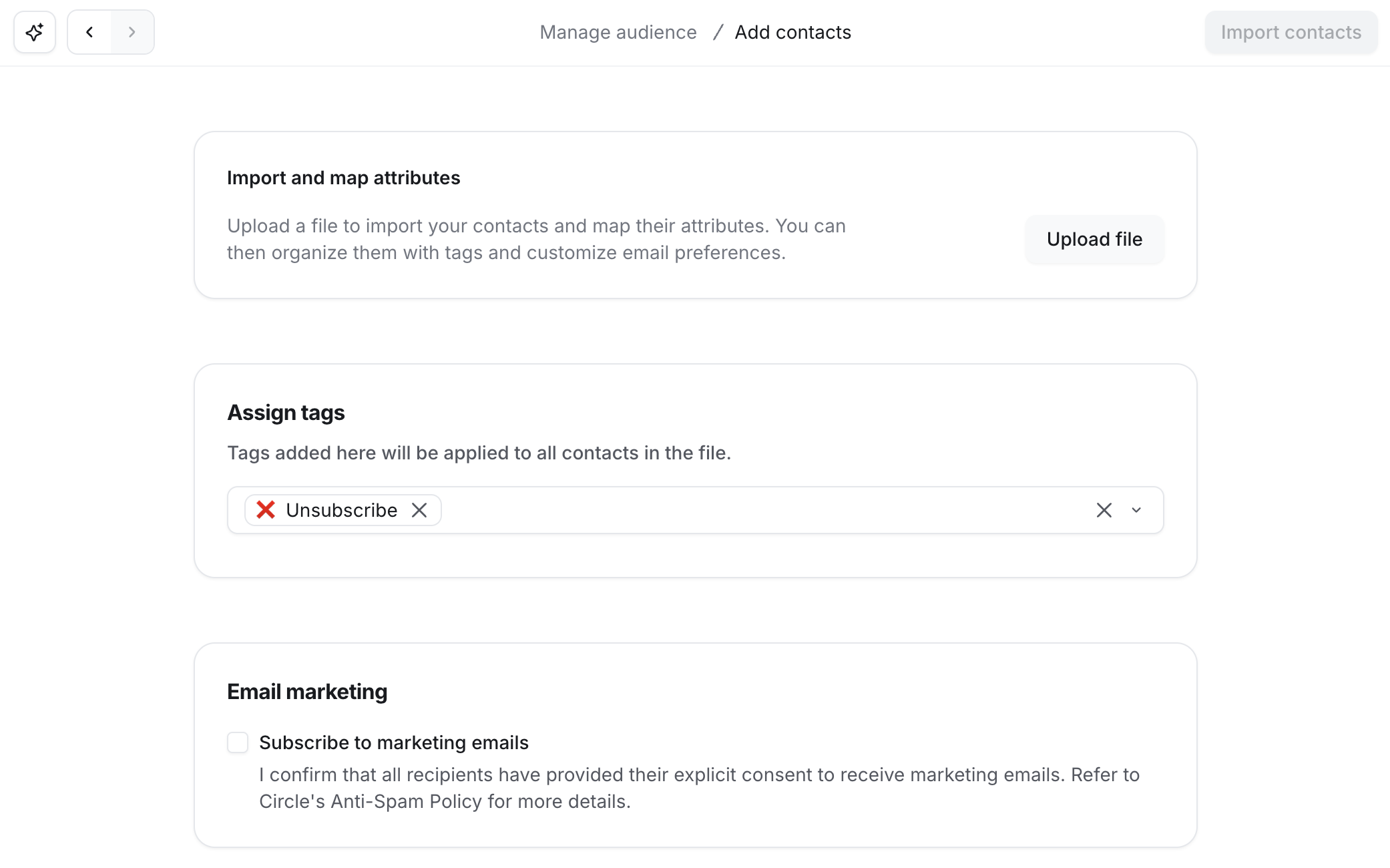
Re-import just that subset as a CSV containing only the email column. A lean file avoids overwriting other profile data on those contacts. On the import screen, use Assign tags to tag the whole batch (for example, "Unsubscribe"). Since these contacts already exist in Circle, they're matched by email and the tag is added to their existing record, so no duplicates are created.
ℹ️ Note: New tags can't be created directly from the import screen. If you don't already have one for this, create it first under Settings → Audience → Tags. See Set up member tags for the full steps.
Create a segment filtered on that tag.
Run a Bulk action workflow with the action Unsubscribe from email marketing, targeting that segment. See Unsubscribe contacts from email marketing for the full steps.
💡 Tip: Test this process on a small sample before running it against your full list.
If your sending is temporarily restricted
Circle monitors delivery-health signals to protect deliverability for you and every other community sending from our platform. If we detect potential deliverability issues within your community , your sending may be temporarily restricted.
If you see a notice that your sending is restricted → this isn't a permanent penalty. Reach out to Support, and we can explain what's affecting your account and help you get sending again.
If your list includes older, unmaintained, or largely unengaged contacts → clean these up before your next send, using the steps above. This is the most common fix and usually resolves the issue going forward.