Circle features: desktop vs mobile apps
Last updated: September, 2026
Circle is available across multiple platforms, including:
Desktop: Via the Circle desktop app or any web browser.
-
Mobile:
The Circle communities app for iOS and Android.
Branded mobile apps for iOS and Android.
This guide covers feature availability across all supported platforms and highlights important details about using Circle on various platforms.
Feature status
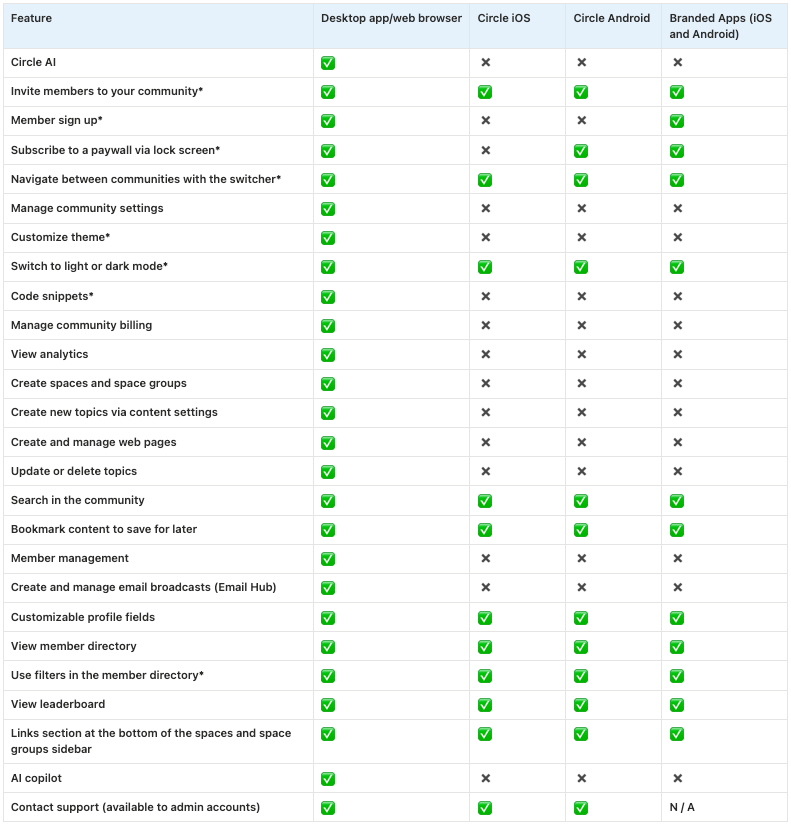
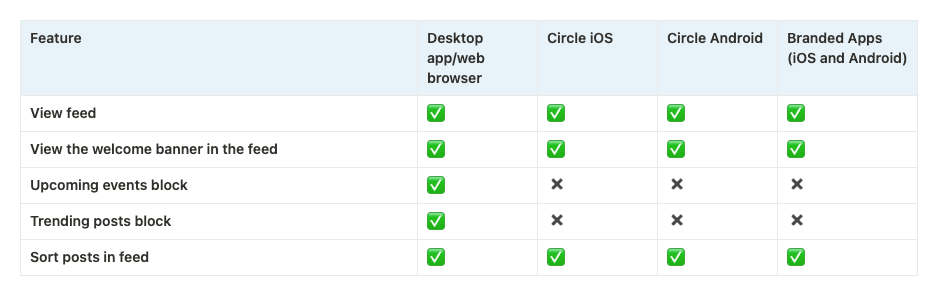
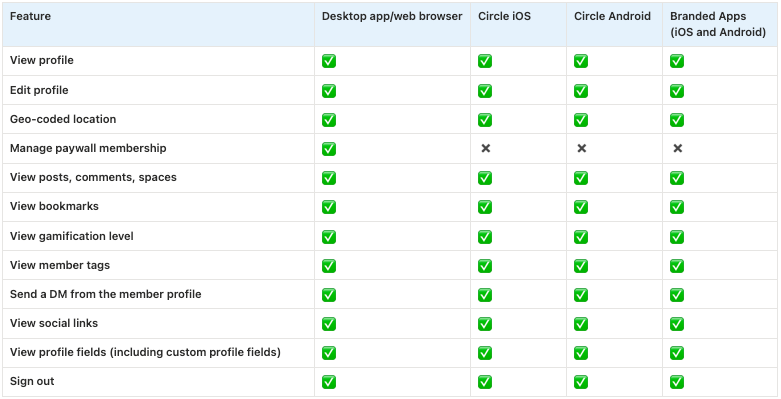
Throughout the comparison tables, you’ll notice the following indicators:
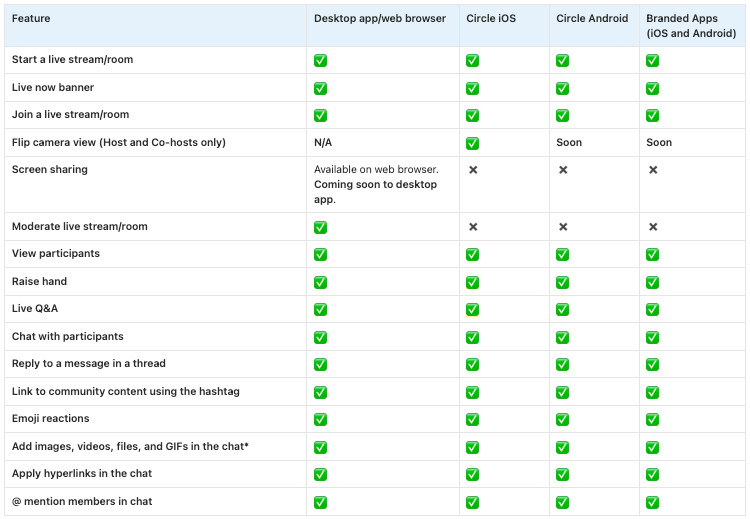
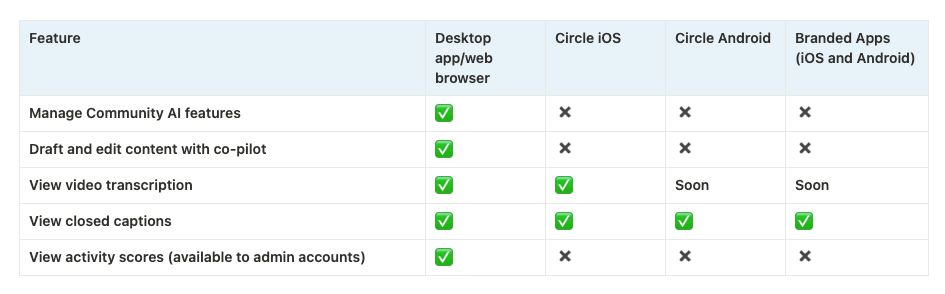
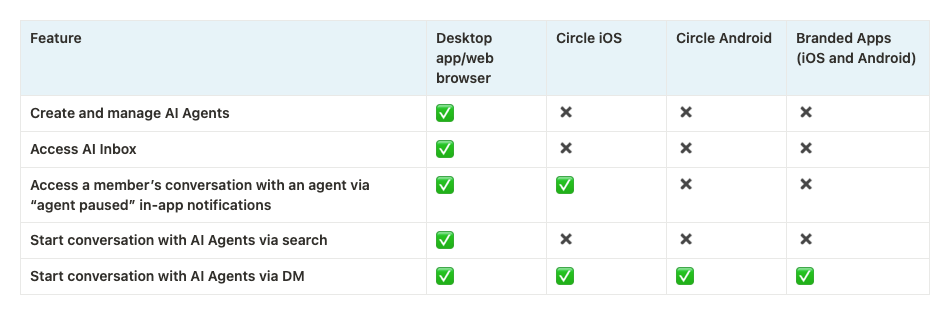
✅ - Supported feature.
Soon - This feature is on our team’s roadmap for release in the near future.
✖️ - This feature is not supported on the platform yet, but this may change in the future.
N/A - Not applicable to the platform.
Community
Feed
Member profile
Notifications
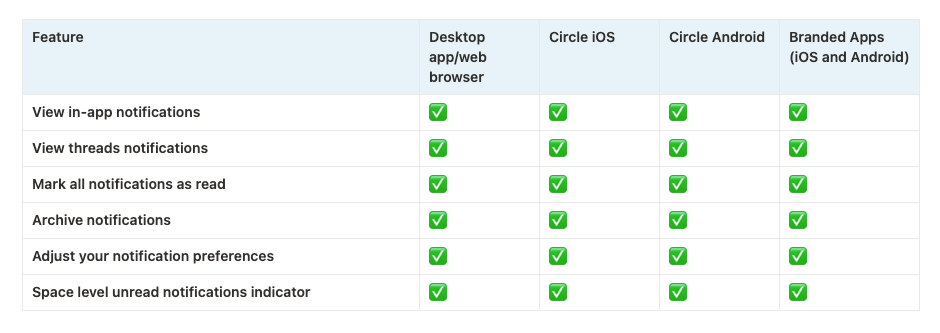
💡 Tip: Users can explore all notification options by heading to their notification settings. There, they’ll see a full list of choices for marketing emails, new activity, and new post notifications, available through email, in-app, and mobile push notifications.
Direct messaging
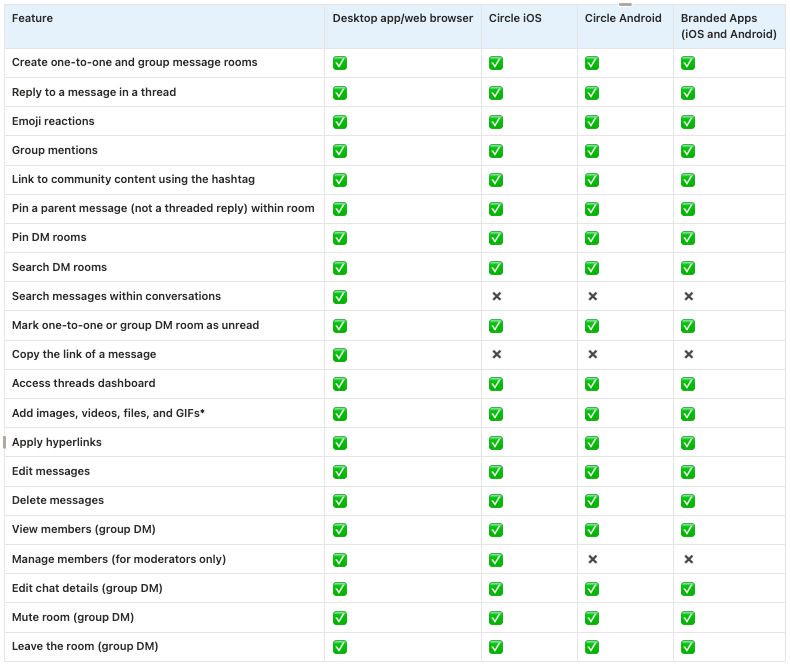
Content moderation
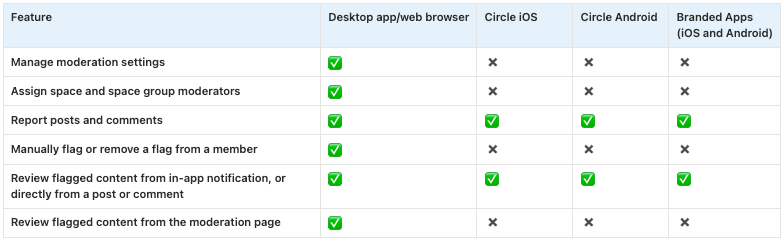
Post spaces
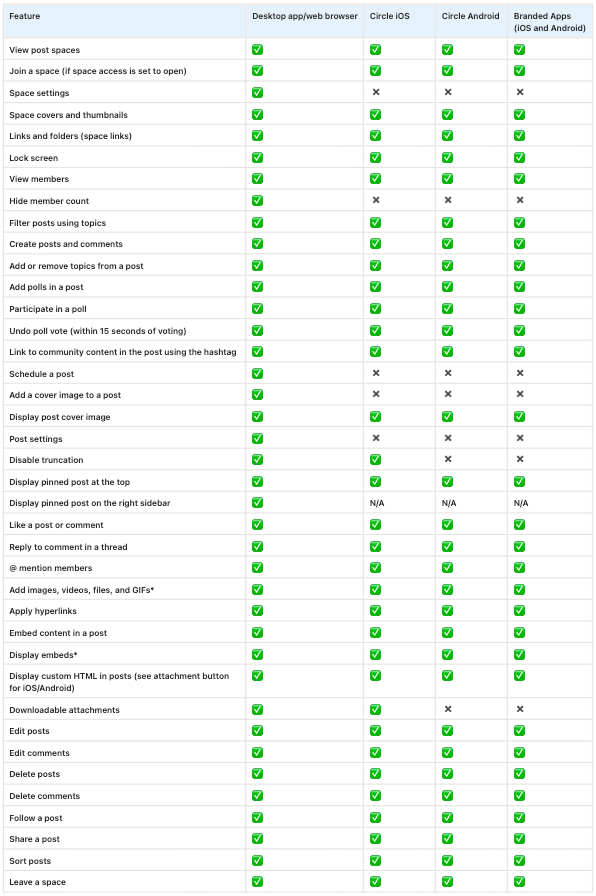
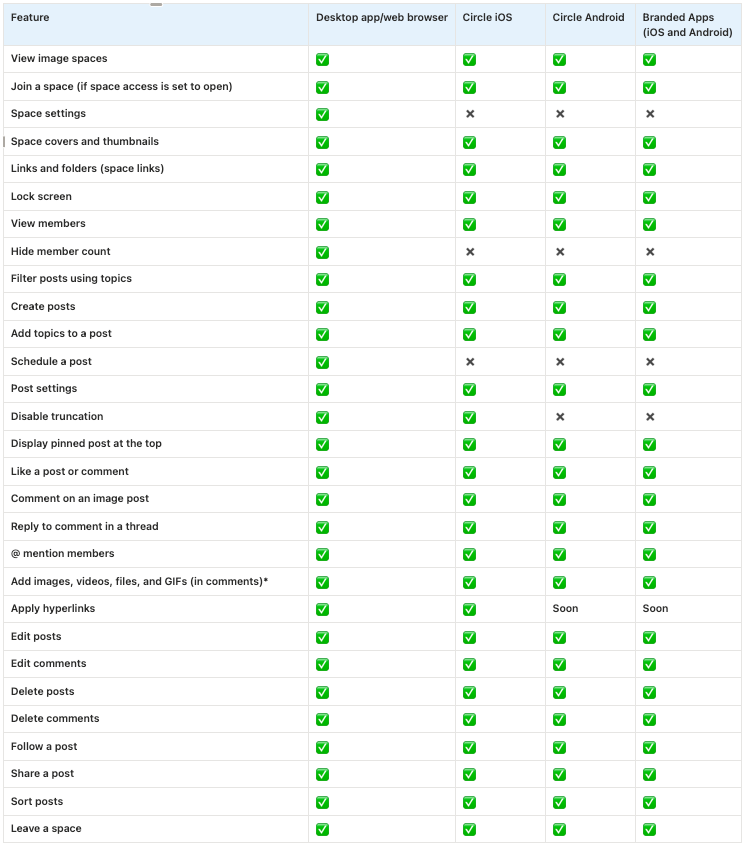
Image spaces
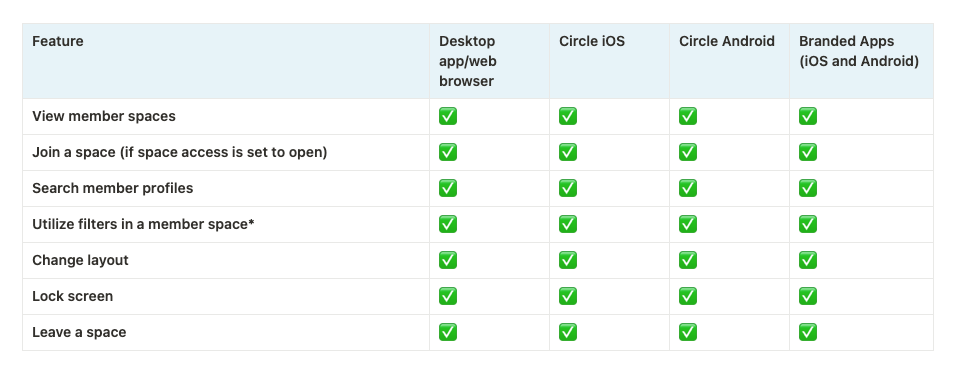
Member spaces
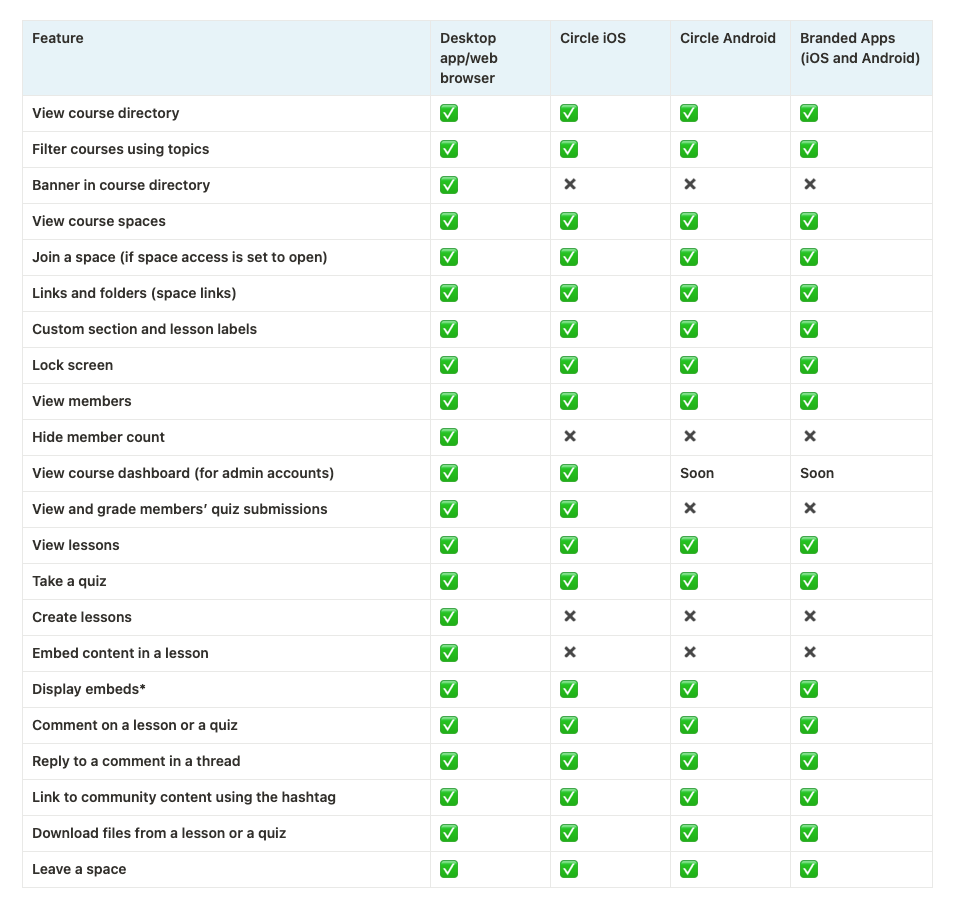
Course spaces
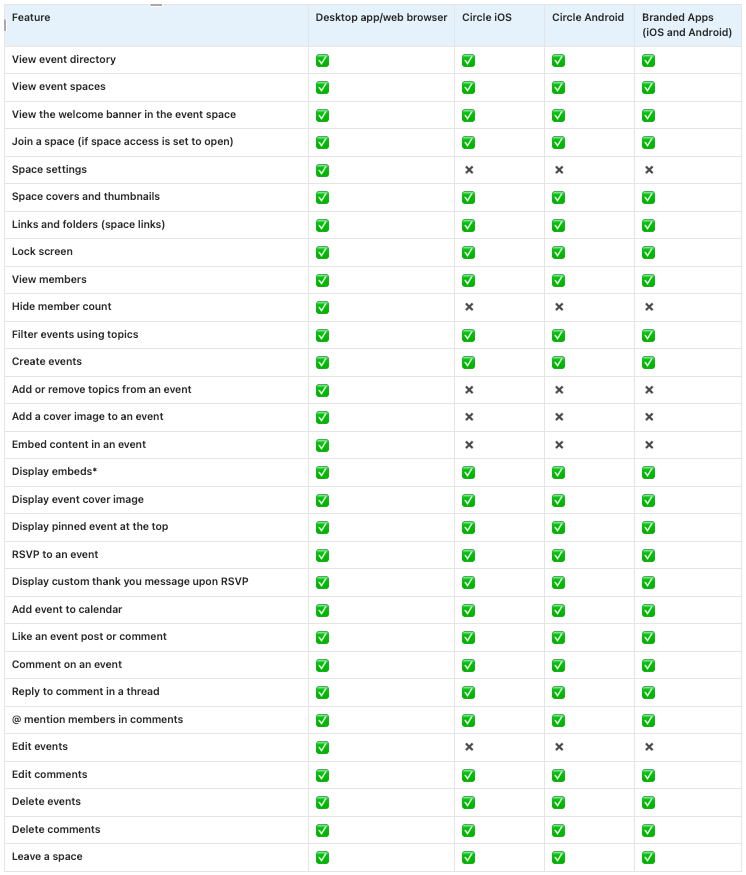
Event spaces
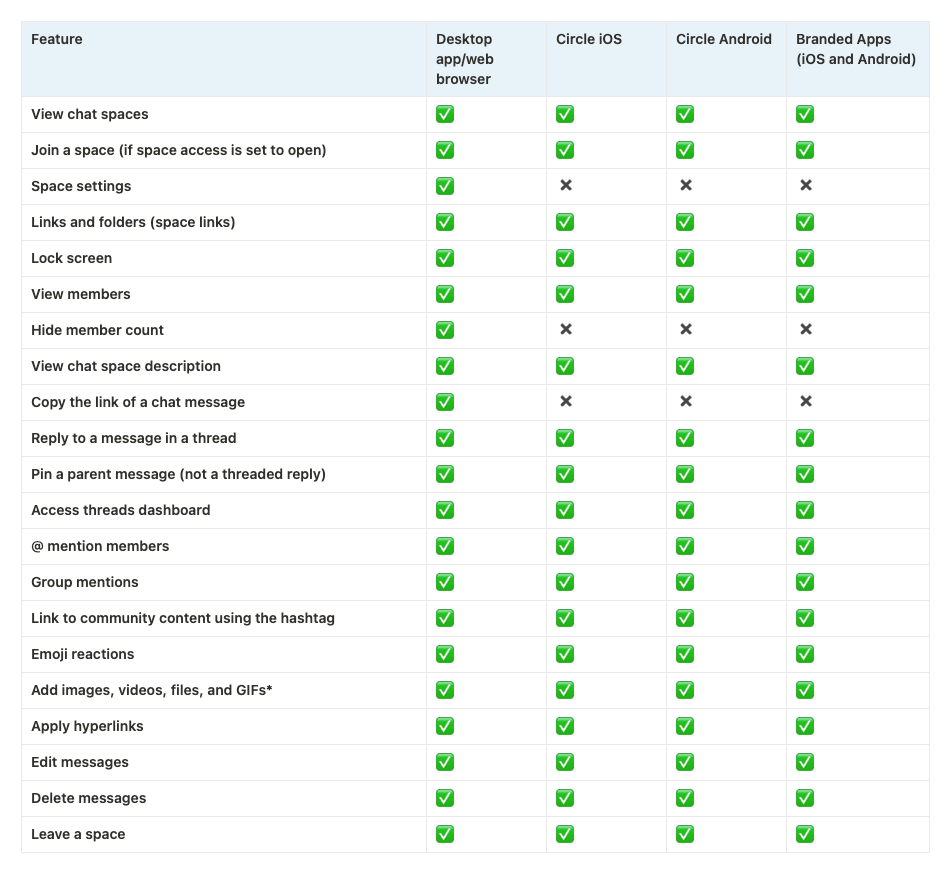
Chat spaces
Live
Community AI (Beta)
AI Agents
*Key details about feature support across platforms
Let’s walk through important information about how certain community features work on mobile and other supported platforms.
Invite members to your community
As an admin, you can use the invite members feature on Circle’s mobile apps and your branded apps to quickly invite members with a few streamlined options. These include choosing whether to send an invitation email, granting admin privileges, and adding tags.
You can also invite multiple members at once by entering their email addresses, separated by commas. To do this, open the app, go to your profile, tap the settings icon in the top-right corner, and select Invite members.
ℹ️ Note: We recommend using a desktop browser to access the full range of options when inviting members, including the ability to use import files, configure access, and paywall trial.
Member sign up
Currently, Circle’s iOS and Android apps do not support member sign up. Members can only log in to Circle’s mobile app using their email and the OTP they receive on their registered email. If a member has already accepted an invite or created an account with an email and password on the desktop, they can complete the final step, which is confirming their profile details when signing into Circle’s mobile app.
In contrast, your branded mobile apps support member sign ups, allowing new users to join your community directly from the app.
Subscribe to a paywall via lock screen
On Circle’s iOS app, if members tap the CTA button that is linked with the paywall URL on the lock screen, they will be redirected to a mobile browser to complete the paywall checkout process.
On Circle’s Android app or your branded apps (both iOS and Android), members can tap the CTA on the lock screen to purchase the paywall without leaving the app. You can also configure in-app purchases for your branded apps through native Apple and Google app store integrations.
ℹ️ Note: If you have linked a paywall URL in community content, such as posts, using a hyperlinked text or button, and a member taps it, the behavior differs by the app. On Circle’s iOS and Android apps, they’ll be redirected to a mobile browser. On your branded apps, the paywall checkout page will open within the app itself.
Navigating between communities with the switcher
If you're connected to multiple communities using the same email address, whether as an admin or member, you can easily switch between them using Circle’s iOS and Android apps.
Please note that the branded mobile apps only show additional communities in the switcher if you have indicated them to the Circle team.
Customize theme
The option to customize your community theme is exclusive to browsers. Any changes you make to the community theme only affect how your community appears when viewed on a desktop or mobile browser. The Circle’s mobile apps will retain their default Circle theme.
Branded apps, however, will adhere to the branding colors that you’ve established during app implementation. If you have any questions regarding your branded apps, reach out to your point of contact at Circle.
Light or dark mode
Both Circle’s and your branded mobile apps automatically adapt to Android and iOS device’s light or dark modes.
For example, when you switch your iOS device to dark mode, the app will automatically change to dark mode, providing a consistent user experience.
Code snippets
Any code snippets you add to the Code snippet setting in the community only work on the browser. Modifications made by code snippets within your community do not affect mobile apps, including your branded apps.
Displaying embedded content
On Circle mobile apps and your branded apps, the embedded content is generally displayed inline. On Circle’s iOS app, if Iframely doesn’t provide a size for the embed, it will show as a link preview instead. This allows members to tap on the preview to open the embedded URL through a browser.
On Circle’s Android and branded apps (iOS and Android), it will automatically adjust the embed’s size for display if IFramely provides no size. For more details on embedding media, see our guide here.
Adding GIFs from mobile device
Just like on desktop, you can easily add GIFs to your content in Circle's mobile apps and your branded apps. Tap the GIF icon in the text editor to browse and insert GIFs from GIPHY directly into posts, comments, chat messages, DMs, or live chat.
If you have a GIF saved on your device, simply select the image option to upload it from your media library instead.
Using filters in the member directory and member-type spaces
On desktop, you can utilize a full range of filters in the member directory and member-type spaces to refine your search.
On Circle's mobile apps and your branded apps, however, filtering options are limited. These are accessible at the top of the screen, just swipe horizontally to view all the available filters on apps.
Functionalities on the desktop app
The desktop app includes all the same features as the web browser. Whether you’re managing your community or engaging within the community, you can do it all from the desktop.
📚 To learn more, see Get to know the Circle desktop app.
Curious about what we are working on?
Check out Circle's public roadmap to see all the features and improvements our team is working on in the current quarter.
For specific updates related to branded apps, take a look at Circle's public branded apps roadmap.