Offer members the option to pay with buy now, pay later
Last updated: August, 2026
Drive higher conversion rates by giving your members buy now pay later (BNPL) options like Affirm, Afterpay, and Klarna with Circle paywalls.
About buy now, pay later
Buy now, pay later (BNPL) is a popular payment method in many countries. It allows members to buy products and services in installments instead of paying the full amount, reducing friction.
While Klarna supports both recurring and one-time fee subscription paywalls, Affirm and Afterpay are limited to one-time payments only.
Here is how it can help your community:
Boost new member sign-ups: You can reduce sticker shock by increasing affordability.
Improve cash flow: You’ll get paid upfront while your members pay over time. No more defaulting payments!
Flexible payment options: By allowing members to split their payments into smaller installments, you can offer them more flexibility and lower financial barriers.
Enhance trust and credibility: BNLP providers like Affirm, Klarna, and Afterpay are widely recognized and trusted, giving your members confidence in their payment options.
Seamless checkout experience: When toggled on in your community, these new payment options will be added to your checkout experience for a frictionless payment process.
Checking out with the BNPL provider
When a member reaches the paywall checkout page, they will see payment options based on their geographic location, currency, and pricing. If a buy now, pay later (BNPL) provider is available, it will be listed under the Payment details section.
Although the onboarding and payment flows may vary between BNPL providers, the general process is as follows:
The member chooses the BNPL option, fills in the required information on the paywall checkout page, and proceeds to pay.
They are redirected to the BNPL provider’s website to complete the transaction. If they already have an account, they can log in. Otherwise, they will go through an onboarding process.
The BNPL provider will present repayment terms based on the member’s eligibility.
Once the member chooses the terms and confirms the payment, they are redirected back to Circle.
Your Stripe business will receive the full one-time payment, while the member will repay the BNPL provider according to the agreed-upon terms of the repayment.
Supported BNPL providers
Circle paywalls support three providers:
Affirm
Afterpay
Klarna
❗ Important: Buy now, pay later providers may offer various payment options (e.g., interest-free payments, monthly financing) to customers based on factors such as the paywall amount, the country, the customer’s purchasing power, and other credit considerations. These payment options, including term lengths, are determined by the providers and may change at their discretion.
Affirm
Affirm provides a flexible financing solution that lets members pay over time with transparent terms.
Payer geography: Canada and the US.
Supported currency: USD and CAD.
Payment options: Allows members to pay in four or fewer interest-free bi-weekly payments or monthly installments, which might include interest.
Transaction limits: $50 minimum; $30,000 maximum, depending on the total paywall amount.
Transaction fees for communities: Stripe’s processing fees for Affirm vary by country and are charged in addition to Circle’s transaction fees. To check the specific fees for your country, visit Stripe’s BNPL pricing page. On the pricing card, click Show additional fees to see any transaction fees that the provider may charge.
Afterpay
Afterpay, also known as Clearpay in the UK, is a popular BNPL that enables members to split their purchases into interest-free bi-weekly payments or monthly installments, depending on the country.
Payer geography: US, Canada, UK, Australia, New Zealand.
Supported currency: AUD, CAD, GBP, NZD, and USD.
Payment options: Members can pay in four or fewer interest-free bi-weekly payments or monthly payments with interest. Monthly installments are available in the US only, depending on the total paywall amount.
Transaction limits: $1 minimum; $1,000-4,000 maximum (varies by the country).
Transaction fees for communities: Stripe’s processing fees for Afterpay vary by country and are charged in addition to Circle’s transaction fees. To check the specific fees for your country, visit Stripe’s BNPL pricing page. On the pricing card, click Show additional fees to see any transaction fees that the provider may charge.
Klarna
Klarna offers members a variety of payment options, such as pay in full, installments, pay later, or finance it for recurring and one-time fee Circle subscriptions.
Payer geography: US, Canada, UK, Australia, New Zealand.
Supported currency: AUD, CAD, CHF, CZK, EUR, GBP, DKK, NOK, NZD, PLN, SEK, and USD.
Payment options: Members can pay in full, pay later within 30 days, pay in three or four interest-free payments, or make monthly installments, which might include interest. These payment options may vary by country.
Transaction limits: Minimum and maximum amount varies by country, currency, and customer.
Transaction fees for communities: Stripe’s processing fees for Klarna vary by country and are charged in addition to Circle’s transaction fees. To check the specific fees for your country, visit Stripe’s BNPL pricing page. On the pricing card, click Show additional fees to see any transaction fees that the provider may charge.
Key things to know about BNPL
-
Availability: Buy now, pay later is available to all community plans. However, the availability of BNPL providers depends on the country where your Stripe business is located.
Paywall price support: Klarna supports both recurring subscription and one-time fee paywalls. Affirm and Afterpay are limited to one-time payments only.
Compliance review: Once BNPL is enabled, providers will review your business for compliance with their policies. If your business does not meet their requirements, the provider’s payment option will be automatically removed from your checkout.
Transaction visibility: When a member purchases a paywall using the BNPL method, you will be able to see the provider listed under the payment method in your Circle community. Similarly, the transaction will be recorded in your Stripe dashboard, with the provider’s name listed under the payment method.
Refunds: You can issue refunds the same way you do for any other payment method. You can provide the refund directly from your community.
Currency and location requirements
BNPL payment options appear dynamically based on location, currency, and pricing, ensuring only eligible methods are shown at checkout.
Here are some important considerations:
-
Currency matching: To accept payments from BNPL providers, the paywall currency must match your Stripe business’s settlement currency. The settlement currency is the currency in which you receive the payout in your bank.
The BNPL options will only be available to customers on the checkout page if the paywall currency matches the local currency of the member’s geographic region. For example, if a member is in the US and buying a paywall membership in GBP, the checkout page will not show any BNPL payment options.
Affirm and Afterpay’s transaction restrictions: Affirm and Afterpay only support transactions within the same country. This means you can only sell to customers who reside in the same country as your business.
-
Klarna’s regional support: With Klarna, businesses based in the UK, Switzerland or a supported EEA country, can transact with consumers in the UK, Switzerland, and all EEA countries where Klarna has a consumer offering, provided if the presentment currency matches the currency of the customer’s country. For example, a Swedish business can present in EUR to accept Klarna from a buyer in Germany.
Klarna’s transaction restrictions: If you’re based outside of the EEA, UK, or Switzerland, you can only transact with customers within your country, and the presentment currency must be the currency of your country. For example, an Australian business must present in AUD, and can only transact with buyers in Australia.
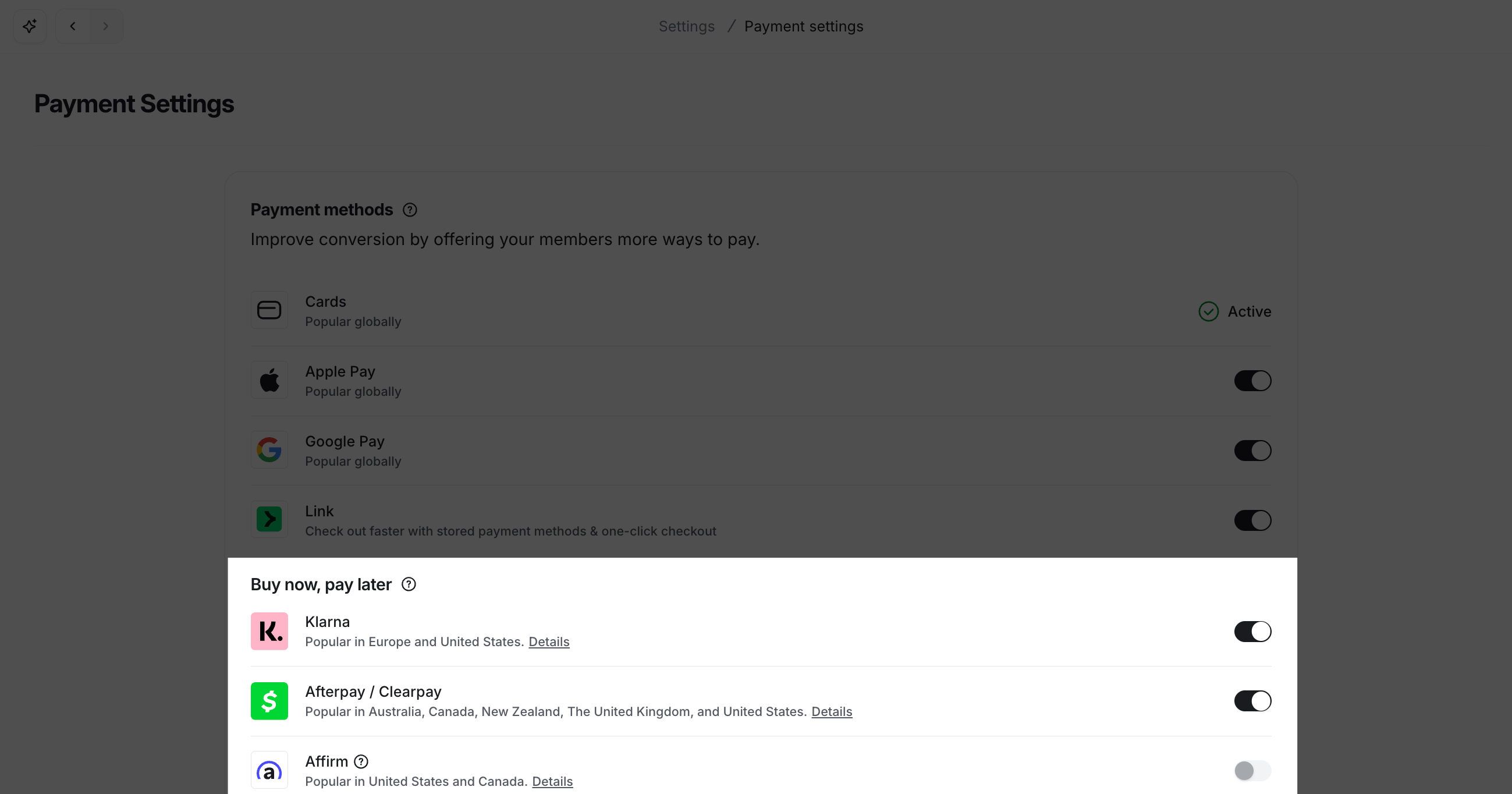
Enable BNPL providers
Once you have connected your Stripe account with the Circle paywall, you can enable the buy now, pay later providers in your community.
Click your community name or logo (or the dropdown icon next to it) in the top-right corner and select Settings.
Select Payment settings in the Payments section.
-
Based on your preference, enable the toggle for desired providers under the Buy now, pay later section.