Enroll in Google and Apple's external content link programs
Last updated: September, 2026
Google and Apple both allow all apps to link users to purchases or content outside their app stores. Both companies now charge fees on purchases made through these external links, and both require you to enroll before you can use them.
With these changes coming, staying compliant means doing two things: enrolling in Apple's and Google's external link programs, and taking payments through Circle Paywalls. One without the other isn't enough.
This article covers what you need to do to stay compliant, what each program is, and how to enroll for both Google Play and Apple's App Store.
What is an external link?
An external content link is a link within your app that takes someone to a web page outside the app to complete a purchase, rather than paying within the app. Both Google and Apple require you to enroll in their external content link programs and get approved before you can add these links to your app.
Key things to know about external link programs
Google and Apple each run their own version of the external content links program, with different names, requirements, and enrollment steps depending on your region.
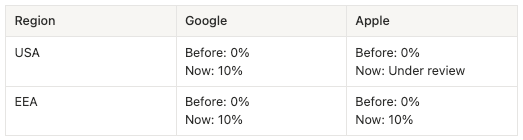
The 10% fees for Google will apply in both the USA and the EEA from October 1, 2026.
The fees for Apple are already in effect in the EEA since June, 2026. In the USA, an ongoing court case is blocking Apple from charging these fees, so no action or fee applies there for now.
If you plan to charge members through paywalls in your branded app, you must enroll in the program that applies to where your members are located.
This is a new and fast-evolving area of policy. Circle's team is monitoring both programs closely. As Google and Apple share more details, we'll update this article.
Understanding compliance with the external links policies
What compliance requires
You're compliant with these policies when you use Circle Paywalls and enroll in Apple's and Google's external link programs. One without the other isn't enough to be compliant with either platform’s terms.
How Circle Paywalls keep you compliant
Circle Paywalls keeps your app compliant through our transaction reporting and ongoing maintenance support.
Transaction reporting: Circle automatically reports your qualifying transactions from your external Circle Paywall links back to Apple and Google, through the reporting APIs each platform requires. The stores then invoice you for the applicable fees. Both platforms make this reporting a required part of enrollment: Google requires developers to integrate with its external transaction APIs to report qualifying purchases, and Apple has a similar reporting requirement for external purchase links. Third-party payment tools don't perform this reporting on your behalf, which leaves apps that use them non-compliant.
Ongoing upkeep: We built Circle Paywalls to meet Apple's and Google's policies, and we keep them up to date as their requirements change, so your compliance stays in order over time.
📚 If you'd like to learn more about Circle Paywalls, contact your Customer Success Manager (CSM).
What happens if you're not compliant
You're non-compliant if you're missing either piece: you aren't enrolled in Apple's and Google's external link programs, or you're using a third-party external payment provider (like your own Stripe, HubSpot, or ThriveCart) instead of Circle Paywalls. Either gap on its own is enough to put you out of compliance.
Both Apple and Google treat non-compliance as a policy violation, not just a missed step. Google can reject the reporting API call for transactions outside an approved program, and can remove non-compliant apps from Google Play. Apple can reject app updates, audit your transactions, and, for confirmed violations, terminate your Apple Developer Program membership or withhold payments owed to you.
What are my next steps?
You have two options for how to proceed:
-
Do nothing for now: You can wait to see whether Apple or Google flags your branded app. If that happens, we’ll let you know, and you’ll need to complete the required enrollment steps outlined in Option 2.
ℹ️ Note: Since May 2026, we’ve seen a very small percentage of apps being rejected for noncompliance. Affected apps have typically had 14 days to comply, or risk removal from the Apple App Store and Google Play Store.
-
Enroll in the external content links program:
-
If you’re using Circle Paywalls:
Enroll in Apple’s and Google’s external link programs by following the steps outlined in the Enroll in Google and Apple's external content link programs section below.
Once enrolled, Circle will automatically report qualifying transactions made through external Circle Paywall links to Apple and Google.
Apple and Google will invoice you for the applicable fees, which will be collected in addition to Circle's transaction fee on purchases made through Circle Paywalls.
-
If you’re not using Circle Paywalls:
Enrolling in Apple's and Google's external link programs is a required step, but it doesn't make you fully compliant.
-
Enroll in Google and Apple's external content link programs
Google's external content link programs
Google runs two separate programs, depending on where your app users are located: the External Content Links program for the US, and the External Offers Programme for the EEA (European Economic Area).
US: External Content Links program
This program lets developers of Google Play-distributed apps link members in the United States to content outside Google Play. For example, if your app links to an external website where members can purchase products, purchase in-app digital items, or download an app directly, you must enroll in this program.
Key things to know:
To be eligible, your app must be a mobile or tablet app or a game that serves users in the United States and its territories.
Google intends to charge developers transaction fees for purchases completed through external content links in the future. Google is not currently assessing or charging these fees.
You must enroll and get approval before using external content links, and integrate with Google's external content link APIs.
You must provide customer support and refund options for users completing transactions outside the Google Play Store.
To enroll in the External Content Links program (US):
Step 1: Request enrollment after your app goes live
As the account owner, sign in to your Google Play Console account.
-
Follow Step 2 of Google's instructions to enroll in the external content links program (complete the declaration form).
To find your Developer Account ID, open the Google Play Console home page. Your account ID appears beneath your developer account name.
To find your branded app's package name, open the Google Play Console home page. The package name appears beneath your app name, in this format: com.appname.community
ℹ️ Note: Google may take up to two weeks to process your request. During that period, Google may email you for additional information. Watch your inbox and respond to those messages.
Step 2: Complete the enrollment
Once Google confirms your enrollment, the account owner's view of Google Play Console changes slightly, letting you complete these steps:
Sign in to your Google Play Console account and go to Settings → External Content Links.
Click Manage next to your branded app.
Under External Content Links, enroll for the United States and click Save.
💡Tip: Refresh the External Content Links page to confirm the United States now shows as enrolled.
📚 You can also refer to Google’s guide on enrolling in the External Content Links program for more information or to contact their support team.
EEA: External Offers Programme
This program is Google's equivalent for members located in the European Economic Area (EEA).
Review the eligibility requirements on Google's guide to the External Offers Programme to confirm your app qualifies.
Sign in to your Google Play Console account and go to Settings → External offers. Complete any onboarding steps shown, including accepting Google's Terms of Service and setting up a payment profile.
To enroll your app:
Open Play Console and go to the External offers page.
Locate your branded app and click Manage in the table. This opens the Monetisation setup page for that app.
-
Click the + Add countries/regions button to select the EEA countries/regions that you want to apply the external offers programme to for this particular app.
The list of selectable countries/regions is determined by the program's availability in those countries/regions.
When you've finished, click Save changes.
📚 To learn more about the full eligibility requirements, fees, and API details, see Google's guide to the External Offers Programme.
After you enroll with Google
After enrolling and completing the steps above, Google may require additional verification, as well as setting up a payments profile. As Google shares more details, our team may complete some steps on your behalf or contact you if we need your assistance. If you have questions while completing the form, contact Google's support team and include specific details.
Apple's external purchase programs
Apple offers its own path for linking members to external purchases and content. Enrolling requires Account Holder permissions on your Apple Developer account.
❗️Important: The Account holder is the only one who can complete these steps.
US: No action required
Apple's related changes to US apps are on hold due to an ongoing court case. If you’re based in the US you don't need to take any action at this time. We'll update this article when that changes.
EEA: Enroll in Apple’s external purchase program
To enroll in the external purchase program:
Sign in to your Apple Developer account as the Account Holder and accept the updated Apple Developer Program License Agreement, which now includes Attachment 14 (dated August 18), under Business → Agreements.
Navigate back to the Agreements page and click Get started to complete the invoicing setup.
-
Under Certificates, Identifiers & Profiles → Identifiers, turn on the StoreKit External Purchases or Offers entitlement for your App ID.
Entitlements are permissions Apple grants your app to use specific capabilities. In this case, external purchase links.
-
Select In-app purchases and External content links.
Apple requires you to select your payment options and locks that selection for 12 months. Selecting both in-app purchases and external content links gives you the most flexibility if you decide to switch between routes later.
📚 To learn more about Apple's payment options, commission rates, and requirements, see Apple's guide to payment options on the App Store in the EU.
Frequently asked questions
What is the update?
Apple and Google are adding new fees on purchases made through external content links in branded apps. An external content link is a link inside a branded app that sends someone to a web page to pay, instead of paying inside the app.
What are the new fees?
Google charges 10% in both the USA and EEA. Apple charges 10% in the EEA. Apple in the USA is under review because of an ongoing court case, so no fee applies there yet.
Is this a Circle fee?
No. This fee is due to a policy change with Apple and Google’s app stores, not Circle, and affects all eligible apps across the Apple App Store and Google Play Store.
Who does this affect?
This affects any business that takes payments through external links in its branded app. If your app isn't live yet, there's no action required right now; however, we recommend keeping these steps in mind.
When does this policy take effect?
Google: Fees apply in both the USA and EEA from October 1, 2026.
Apple: Fees are already in effect in the EEA since June, 2026. In the USA, an ongoing court case is blocking Apple from charging these fees, so no action or fee applies there for now.
I’m already using Circle paywalls. What do I need to do?
You're set up for the compliant path. Once you enroll in Apple's and Google's external link programs, Circle handles the rest:
Circle automatically reports qualifying transactions made through your external Circle Paywall links, and Apple and Google invoice you for the applicable fees.
We've built Circle Paywalls to comply with Apple's and Google's policies, and we keep it up to date as their requirements change, so compliance is handled for you.
What happens if I’m not using Circle Paywalls?
You won't be compliant, even if you enroll in the external link programs. Enrolling on its own isn't enough. Compliance requires reporting qualifying transactions to Apple and Google via external link APIs and keeping up with each store's changing policies. This is what Circle Paywalls handles for you.
If you use an external payment provider outside of Circle Paywalls, that provider doesn't do this reporting, so you won't be compliant, and your app is at risk of rejection or removal from the store.
If you’d like to learn more about Circle Paywalls, please contact your Customer Success Manager (CSM).