Getting notified when a new member joins your community
Last updated: October, 2026
Staying informed when new members join your community helps you offer a warm welcome and track community growth. In this article, you'll learn how to enable member join notifications in Circle, and discover how to automate alerts using third-party integrations.
Receive notifications in Circle
Circle offers built-in notification options that allow admins to receive alerts when a new member joins the community.
Key things to know:
Admin-only access: New member join notifications are available exclusively to admins within your community.
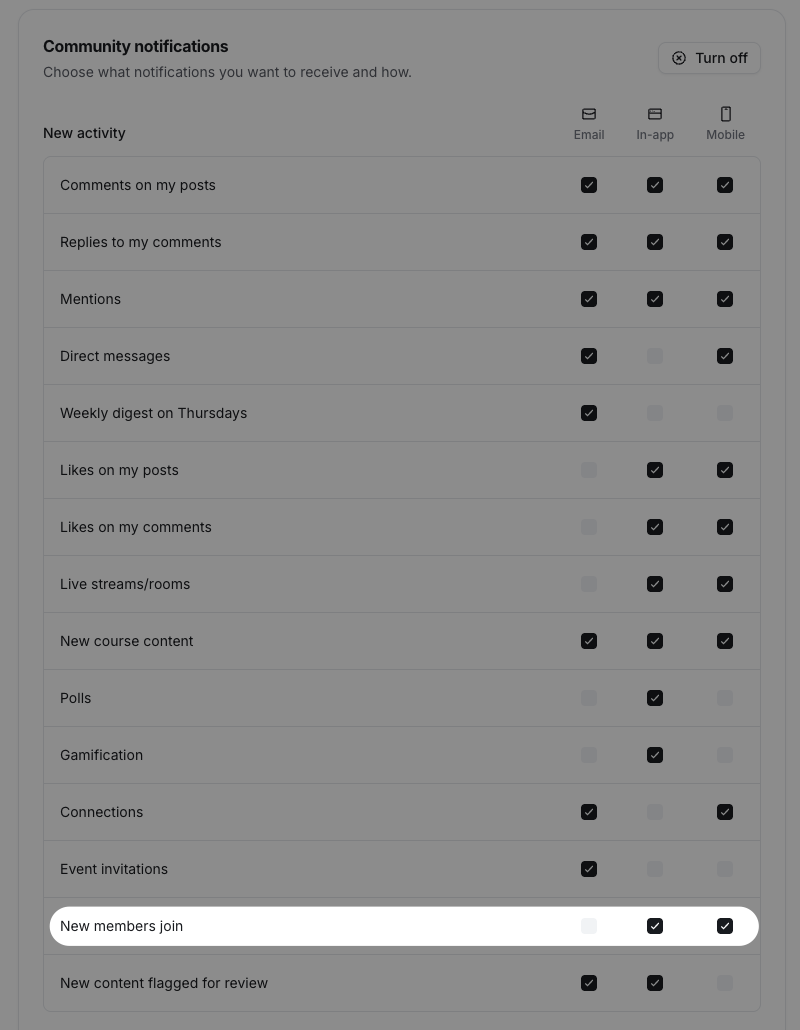
Notification types: Admins can choose to receive in-app and mobile push notifications when a new member joins.
Trigger conditions: Notifications are triggered only when a member signs up and completes the onboarding process, including confirming their profile.
To enable this notification for your admin account:
Click the community name or logo (or the dropdown icon next to it) in the top-left corner and select Back to community.
Click your profile photo in the top-right navigation bar and select Notifications.
-
In the New activity section, select your preferred notification type checkboxes for New members join notifications.
Click Save changes.
Set up notifications using Zapier
Circle offers integration with Zapier, allowing admins and moderators to receive custom notifications when new members join your community. With Zapier, you can automate alerts via popular platforms like Slack, Gmail, and more.
For example, you can automatically send a message to a Slack channel or receive an email in Gmail every time a new member joins.
When setting up a Zap:
Select the Circle app as the trigger and connect your community. Choose the New Member Added trigger.
Select your preferred app for the action (e.g., Slack), and choose an action (e.g., Send Channel Message).
💡 Tip: Besides Zapier, you can also use other automation tools like Integrately and Make (formerly Integromat) to set up similar workflows.
📚 If you need help connecting Circle to Zapier, check out our step-by-step guide.